


Braindom: Brain Games Test
4.617.28K Reviews
App Specs
- Version
- 2.7.4
- Updated On
- License
- Free
- Downloads
- 100,000,000+
- Developer
- Lahana Game Studio
- Categories
- Puzzle
- Platform
- Android, iOS
Screenshots

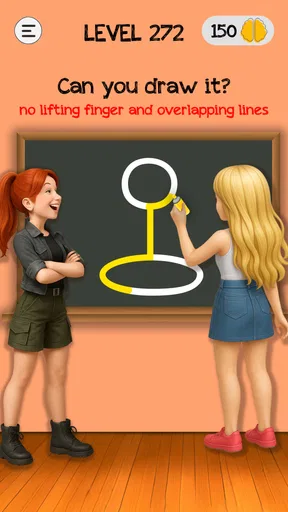
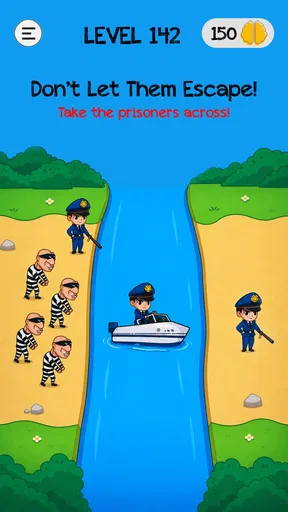

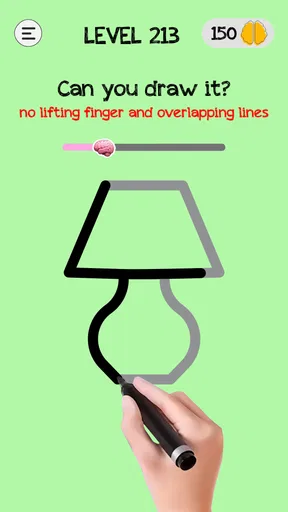

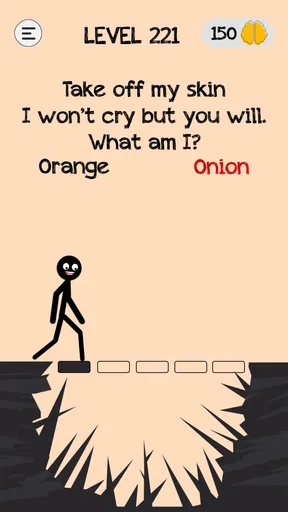

 Analysis by AppCompare
When I have a few spare minutes and want something more engaging than scrolling, I’m drawn to puzzle games that give me a small problem to untangle without demanding a long session. Braindom: Brain Games Test fits that mood: it mixes riddles, logic puzzles, and visual challenges, so the fun often comes from questioning my first assumption rather than applying one familiar trick. I find it best approached as light, playful problem-solving, not as a formal brain-training course.
A useful way to settle into a level
My simplest routine is to read the prompt once, inspect the whole screen, then decide what the puzzle is actually asking before tapping. That pause matters here: some challenges look straightforward but hinge on a small twist. When I rush, I’m more likely to follow the most obvious interpretation and miss the playful one. Taking a moment to check the wording and visual details makes a short session feel more satisfying, even if I still need a hint now and then.
I also treat each level as a self-contained puzzle rather than trying to build a grand strategy across the whole game. A visual challenge and a riddle may reward different kinds of attention, so carrying one solution habit into every new screen can be counterproductive. If I’m stuck, I step back and ask what assumption I’m making: am I reading a clue too literally, overlooking an object, or expecting the answer to be more complicated than it is? That reset is often more useful than tapping randomly.
Where it fits into an ordinary day
A realistic use case is a short wait—say, while a drink is brewing or before an appointment—when I want a bit of focus but don’t want to start a game that needs a long uninterrupted stretch. The changing puzzle styles make that kind of stop-and-start play feel less repetitive than a run of identical word questions. I can enjoy one challenge, put the phone away, and return later without needing to remember a complicated plan.
That same flexibility makes it an easy game to share casually with someone nearby. I can let a friend look at a puzzle and hear their first guess, which is often entertaining because two people may notice different details. I wouldn’t choose it as a serious multiplayer activity, though; the appeal is the puzzle itself, not a deep team mode or a sustained competition. The social comparison mentioned in the game can add a little motivation, but it isn’t the main reason I’d install it.
Who will enjoy the style—and who may not
I’d recommend this to people who like lateral-thinking questions, quick logic problems, and visual riddles, especially if they enjoy being surprised by a simple answer. It can also work for families looking for a light puzzle to discuss together. The age rating is Everyone, but I’d still expect younger players to benefit from an adult helping with wording or explaining why a solution works; an age label doesn’t make every riddle equally easy for every reader.
On the other hand, I’d steer away if you want a carefully graded course with measured progress in a particular skill, or if you prefer puzzles that follow one consistent rule set. This game’s variety is part of its charm, but it can also make the experience feel uneven: one level may click immediately, while another depends on noticing a particular visual cue or interpreting a prompt in an unexpected way. Players who dislike that kind of “aha” trick may find the surprises irritating rather than clever.
Worth Reading Before You Choose

Baby Panda World Brings Quick Play to Modern Phones, but Its Game Library Feels Busy

ESPN’s Live Game View Makes Following Close Games Easier

QuizzLand Review: A Good Fit for Short Trivia Breaks, Not Every Player

Basketball Stars: Multiplayer Is Fast, but Can It Recover When Matches Go Wrong?

WEBTOON Turns Phone Updates Into a Better Reading Routine

Link to Windows Runs on Shared Habits, Not Social Feeds
There’s also a practical difference between this and a standard crossword or sudoku app. Those familiar formats let me settle into a repeatable method and see steady progress within a grid. Braindom is more about switching perspective from one challenge to the next. If I want a calm, methodical session, I’d choose a conventional number or word puzzle; if I want a varied set of bite-sized brain teasers, this is the better fit. It’s a distinction worth knowing before downloading, because the two styles can both be called puzzle games while feeling quite different in use.
Small habits that make the puzzles feel fairer
I get more from the game when I make one deliberate attempt before using a hint. I read the prompt again, look at the entire image, and test one sensible interpretation. If that fails, I change the assumption instead of repeating the same tap. This keeps hints useful as a nudge rather than turning them into my default way through a level. Since hints are available when I get stuck, I can use them to regain momentum, but I prefer to save them for moments when I have genuinely run out of ideas.
Another helpful habit is to stop briefly when frustration starts replacing curiosity. A puzzle that seems obvious to the game’s designer can feel opaque when I’ve locked onto the wrong detail. Looking away and returning with fresh eyes is a low-effort reset; it doesn’t require a special tool or a complicated system. I also avoid treating a missed answer as a test of intelligence. These are designed for playful misdirection, and noticing the intended angle is part of the entertainment.
Settings, access, and the practical trade-offs
The game is free to install, with in-app purchases listed from $1.49 to $6.99 per item. I’d start with the free experience and decide whether anything optional is worth paying for only after I’ve seen how often I play and how I feel about the available hints. That approach suits a casual puzzle game: there’s no need to spend just to find out whether its style clicks with me. I’d also check the device’s sound and notification settings to make the experience fit a quiet waiting room or a shared space, rather than assuming every session should be played the same way.
One detail worth keeping in mind is that “free” doesn’t mean every possible purchase is irrelevant to every player. If I’m trying to keep a child’s play simple, I’d review purchase controls on the device before handing it over. That’s a general bit of sensible setup for any game with optional purchases, not a claim about a special control inside Braindom. For my own use, I’d rather pause and think than pay to hurry through a puzzle; the solving is the point.
There are trade-offs in the presentation, too. The colorful, approachable look lowers the barrier to trying a puzzle, but players seeking a restrained interface or a serious training atmosphere may find it too playful. The occasional ad can interrupt the flow, even though I don’t experience the game as an endless stream of pop-ups. If uninterrupted concentration is essential, a paper puzzle or an ad-free alternative may be a better choice for that moment.
What the game’s popularity does—and doesn’t—tell me
Lahana Game Studio’s puzzle game has been available since June 5, 2020, and its current version is 2.6.8. It has a 4.7 average from around 2.2 million ratings, with about 17,000 written reviews and over 100 million installs. That reach tells me the quick, accessible puzzle format has found a large audience, but it doesn’t guarantee that every level will suit my taste. I’d use popularity as a reason to consider trying it, not as proof that its particular style is right for me.
For compatibility, the listed minimum operating system is 8.1, so I’d check that my device meets the requirement before planning to play. The game is free and rated for Everyone, which makes trying it straightforward, while the optional purchases are a reason to be thoughtful if a child will use the device. Those practical details matter more than a promise that every puzzle will be easy or that every session will be uninterrupted.
A quick peek inside the app
First things first, when you open up Braindom: Brain Games Test, you’re greeted with a bright and colorful interface that immediately sets a playful tone. It’s inviting without being overwhelming, and that’s always a plus in my book. The app is structured around a series of brain teasers and puzzles that vary in type and difficulty.
Game modes and challenges
One of the things I love about Braindom is the variety it offers. You’re not just stuck solving the same type of puzzle over and over. Instead, it throws a mix of riddles, logic puzzles, and even some visual challenges your way. This keeps things fresh and, let’s be honest, keeps you from getting bored!
Each level is designed to test your creativity and problem-solving skills. Some puzzles might seem straightforward at first, but they often come with a twist that makes you go, “Oh, wait a minute!” There’s a real sense of satisfaction in figuring out these little brain-benders.
User experience and design
The user experience is smooth, and the app runs well without any noticeable glitches, which is always a relief. The design is intuitive, so even if you’re not very tech-savvy, you’ll have no trouble navigating through the different sections.
What’s also cool is that the app doesn’t bombard you with ads every five seconds. Sure, there are some, but they’re not too intrusive, and that’s something I appreciate. It allows you to stay focused on the game itself rather than getting distracted by endless pop-ups.
Social and interactive elements
Braindom also incorporates some nice social elements. You can connect with friends and compare scores, which adds a bit of competitive spice to the mix. It’s always fun to see if you can outsmart your buddies!
If you ever find yourself stuck on a puzzle, the app has hints available. These aren’t handed out like candy, though, so you’ll still need to use your noggin to progress. It’s a good balance between challenging and accessible.
Why you might love it
If you’re someone who enjoys puzzles and brain games, you’ll find Braindom to be a delightful companion. It’s perfect for those little pockets of downtime when you want to engage your brain but don’t have a lot of time on your hands. Plus, the variety of puzzles ensures that there’s something for everyone.
The app is great for all ages, too. Whether you’re a kid looking to have some fun or an adult wanting to keep your brain sharp, there’s something here to keep you engaged. It’s a fun way to pass the time and maybe even learn a thing or two along the way.
Final thoughts
All in all, Braindom: Brain Games Test is an entertaining and challenging app that offers a nice mix of puzzles and brain teasers. It’s well-designed, easy to use, and doesn’t overwhelm you with ads, which is a big win in my book.
If you’re on the hunt for a new app to test your mental mettle, give Braindom a shot. Who knows, you might just find yourself getting hooked!
My verdict after settling into its rhythm
What makes this game work for me is the contrast between quick access and unpredictable answers. I can open it for a small mental break, but I can’t assume every challenge will yield to the same method. That keeps the sessions lively, while also setting a clear limit: if I want a structured course, a quiet logic grid, or a game built around long-term mastery of one puzzle format, I’ll be happier elsewhere.
I’d give it a try if the idea of short, playful riddles sounds appealing and I’m comfortable with occasional ads and optional purchases. I’d skip it if interruptions spoil my concentration or if I’m specifically looking for rigorous skill tracking. For the right mood, though, it’s an easy game to pick up, think through, and put down again—and that simple fit is why I’d recommend giving it a chance.
Pros
- Engaging puzzles that boost creativity.
- Wide variety of brain teasers available.
- User-friendly interface with intuitive design.
- Regular updates with new challenges.
- Offline play mode for convenience.
Cons
- Contains ads that can be intrusive.
- In-app purchases can be pricey.
- Some puzzles may feel repetitive.
- Requires internet for certain features.
- Occasional bugs causing minor glitches.
FAQs for Braindom: Brain Games Test
What is Braindom: Brain Games Test?
Braindom: Brain Games Test is a mobile app designed to challenge and enhance your cognitive abilities through a variety of puzzles and quizzes. The app offers a range of engaging brain teasers, logic puzzles, and trivia questions that cater to all ages, making it a fun and educational tool for improving mental agility.
Is Braindom suitable for all age groups?
Yes, Braindom is suitable for users of all ages. It features puzzles and games that range in difficulty, ensuring that both children and adults find the challenges engaging and appropriate. The user-friendly interface and diverse content make it accessible for families looking to enjoy brain-training activities together.
Does Braindom require an internet connection to play?
No, Braindom does not require a constant internet connection to play. Once downloaded, users can enjoy most of the puzzles and challenges offline. However, certain features like leaderboards or updates may require internet access to provide the full interactive experience.
Are there in-app purchases in Braindom?
Yes, Braindom includes in-app purchases. While the app offers a free version with plenty of content, users have the option to purchase additional hints or unlock premium features to enhance their experience. These purchases are optional and do not hinder the core gameplay available to free users.
How does Braindom help improve cognitive skills?
Braindom helps improve cognitive skills by offering a variety of puzzles that stimulate different parts of the brain. These puzzles encourage critical thinking, problem-solving, and memory enhancement. Regular play can help sharpen mental acuity, increase attention span, and improve overall cognitive function, making it a beneficial tool for mental exercise.


